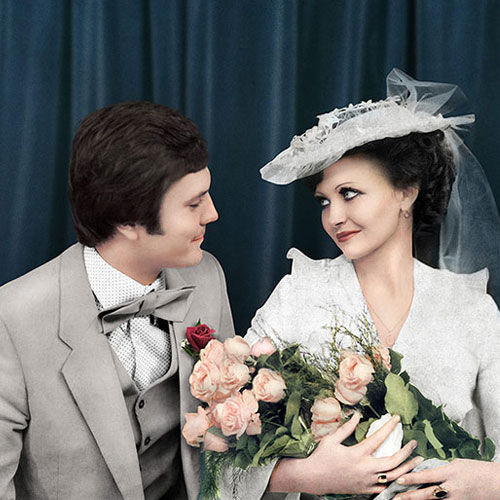

Color is one of the most powerful elements in photography. It sets the mood, communicates quality, and shapes how viewers emotionally respond to an photo. However, lighting issues, camera limitations, or mixed environments often result in dull colors, incorrect white balance, or inconsistent tones.
Our Digital Photo Color Correction process is designed to restore accuracy, enhance visual appeal, and maintain realism — without over-processing. We focus on making photos look natural, vibrant, and consistent while respecting the original intent of the photograph. Here’s how our color correction workflow delivers professional, reliable results:
Understanding the Purpose & Visual Intent
Before touching any photo, we first understand how and where it will be used. Color correction for eCommerce, portraits, weddings, real estate, or marketing campaigns all require different handling.
We consider:
- Intended use (web, print, marketplace, social media)
- Desired mood (natural, warm, vibrant, neutral, cinematic)
- Brand or style guidelines
- Reference photos, if provided
Secure photo Submission & Technical Review
Once your photos are shared securely, our team carefully evaluates them at a technical level. We examine exposure, white balance, color casts, contrast, and dynamic range.
At this stage, we identify issues such as:
- Yellow or blue color casts
- Overexposed highlights
- Crushed shadows
- Washed-out colors
- Inconsistent tones across photos
This assessment helps us define the exact correction strategy for each photo.
White Balance & Exposure Correction
Color accuracy starts with proper balance.
We neutralize unwanted color casts, correct white balance, and adjust exposure to ensure highlights, midtones, and shadows are evenly distributed. This step alone can dramatically improve photo clarity and realism.
Skin tones, whites, and neutral areas are corrected first to create a clean, accurate foundation.
Color Tone & Contrast Balancing
Once the base is corrected, we refine overall color tones and contrast. This step enhances depth without making the photo look harsh or artificial.
We carefully:
- Restore natural colors
- Balance saturation levels
- Improve contrast for clarity
- Maintain smooth tonal transitions
The photo becomes visually pleasing while staying true to real-life colors.
Color Tone & Contrast Balancing
Once the base is corrected, we refine overall color tones and contrast. This step enhances depth without making the photo look harsh or artificial.
We carefully:
- Restore natural colors
- Balance saturation levels
- Improve contrast for clarity
- Maintain smooth tonal transitions
The photo becomes visually pleasing while staying true to real-life colors.
Subject-Specific Color Refinement
Different elements within an photo often need individual attention.
We fine-tune:
- Skin tones to look healthy and natural
- Product colors to match real items
- Fabrics, materials, or surfaces for accuracy
- Background colors for harmony
Selective adjustments ensure nothing looks flat, oversaturated, or unnatural.
Consistency Across Image Sets
When working with multiple photos — such as product catalogs, wedding galleries, or real estate listings — consistency is critical.
We match color tones, brightness, and overall mood across all images so the final set looks cohesive and professionally edited, not randomly corrected.
This is especially important for branding and storytelling.
Final Quality Review & Optimization
Before delivery, each photo is reviewed at high resolution on calibrated displays. We zoom in to check color accuracy, transitions, and overall balance.
photos are then exported according to your requirements — optimized for web, print, or specific platforms — ensuring colors remain accurate across different screens and formats.
Secure Delivery & Revisions
Your corrected photos are delivered securely within the agreed timeline. If you need adjustments, warmer tones, slightly muted colors, or a different mood — revisions are handled quickly and professionally.
Our goal is not just correction, but satisfaction and long-term collaboration.